New in 1.5Walk-away lock, a desktop widget & Siri, calls with any phone app & more

Your Android phone,
on your Mac.

Notifications, clipboard, files and battery — over your own Wi-Fi or Bluetooth. No account. No cloud. Encrypted end to end.

FinderFileEditViewGoWindow 57%
Notes
Trip to Goa ✈️

Flight 6E 2131 · Gate 14 · 06:40

Wi-Fi password: sunflower42

Hotel check-in after 2 pm

Select any text and press ⌘C

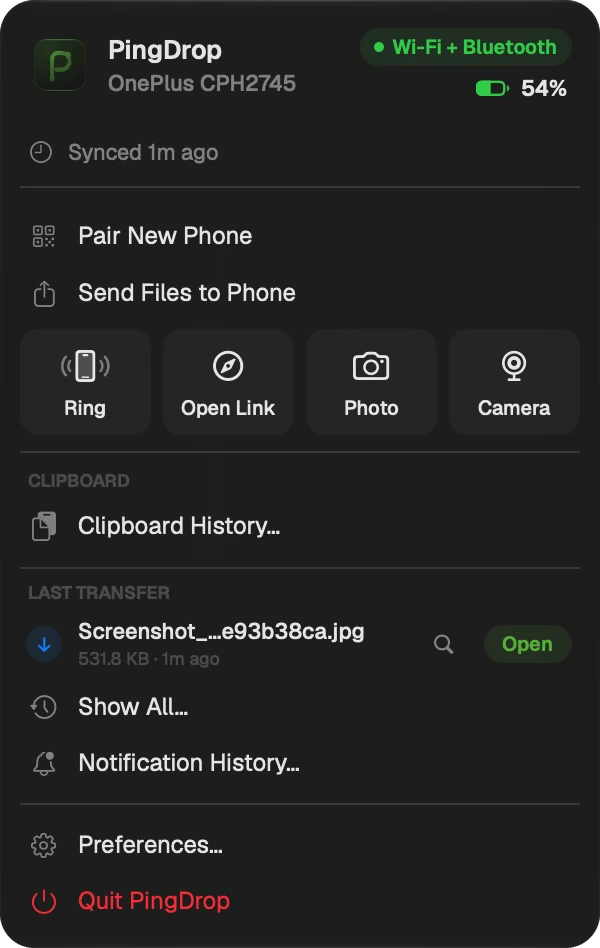
PingDrop's menu bar panel
⌘ C
9:4157%
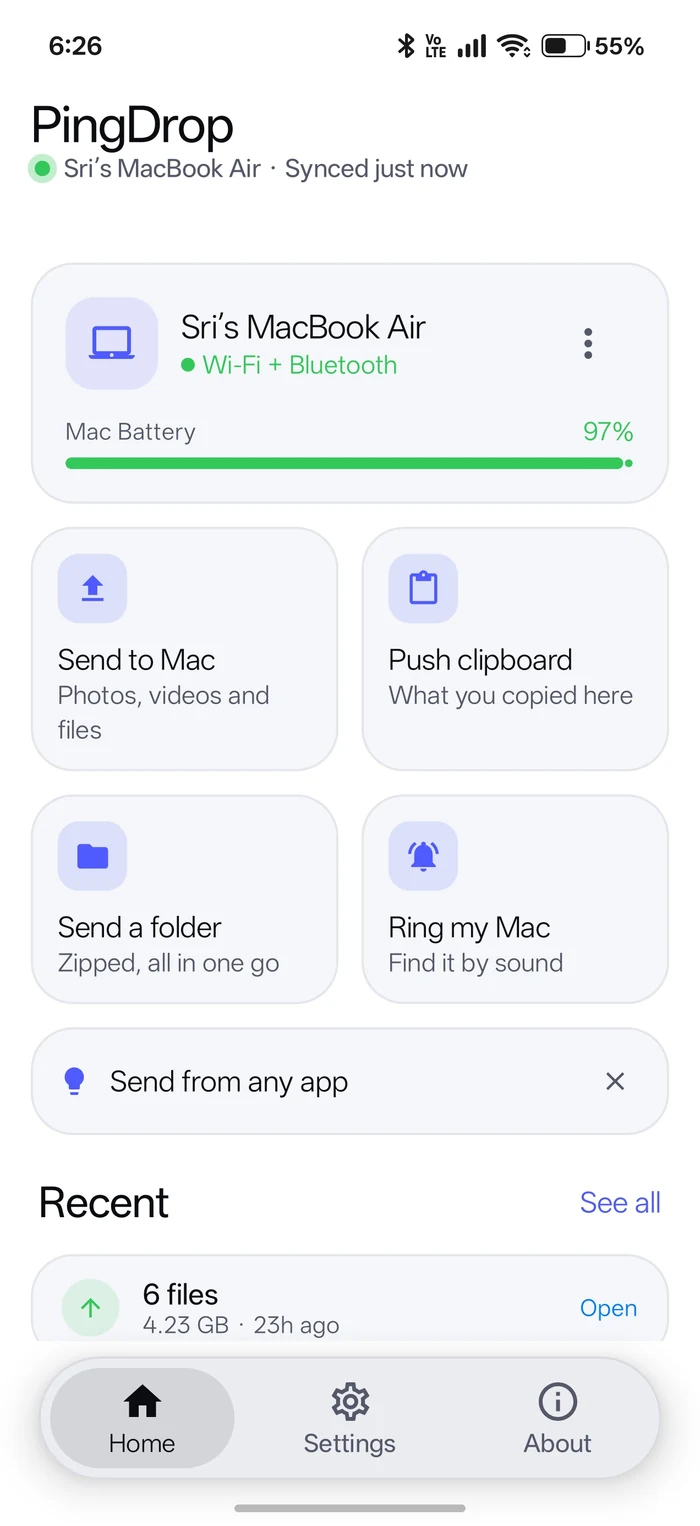
PingDrop on Android
9:41
Friday, 2 October
R
Riyaonline

Landed! What's the hotel Wi-Fi?

MessagePaste
Try it

Click a file on the Mac's desktop, the clock, or the PingDrop icon in the menu bar.

Features

Everything on your phone,
without picking it up.

Each one below is a working little Mac and phone — try them.

Notifications

Your phone's notifications, on your Mac.

Choose which apps, one by one. Clear one on either side and it's gone from both.

3 on both

Click × on the Mac or the phone

9:41
9:4157%
9:41
Clipboard

Copy here, paste there.

Mac to phone automatically. Phone to Mac with one tap — Push clipboard to Mac, the Quick Settings tile, or the share sheet.

9:41
Notes
Copied
9:4157%

What's the Wi-Fi?

Pasted
Files

Files, both ways.

Drop files on PingDrop in the menu bar, or share from any Android app. They land in Downloads.

Click a file on the Mac, or a photo on the phone

9:41
9:4157%

Photos

Downloads

Nothing yet

Battery

Charge at a glance.

Your phone's battery in the Mac menu bar, your Mac's on the phone — with alerts when it matters.

Phone battery 57%
57%9:41
Phone batteryOnePlus at 20% — time to charge
9:4157%
MacBook Air76% · Charging ⚡
Connection

Stays connected.

Wi-Fi at home, Bluetooth LE when you're out. It switches over on its own.

Privacy

Private by design.

Phone and Mac talk directly, encrypted with AES-256-GCM. No account, no server — the Mac app makes no internet connections.

Hover the wire to read what's on it

Updates

Keeps itself current.

Each app notices when the other is out of date. Android updates itself from Google Play.

9:41
PingDrop updateA newer version is ready
9:4157%
PingDrop for MacOut of date — update it

New in PingDrop 1.5

  • Walk-away lockYour Mac locks itself when you walk away with your phone. Calibrate it at your desk — it won't lock while you're typing. Pro.
  • Widget, Siri and ShortcutsYour phone's battery and Ring on your Mac's desktop, and “Hey Siri, ring my phone” — add it in one click from Preferences.
  • Calls with any phone appAnswer and end calls from your Mac whatever phone app you use. Close the call card and the call stays in the menu bar.
  • Only your MacConnects only to the Mac it was paired with — even with another PingDrop Mac nearby.
  • Back in secondsOpen the lid and it's connected again by itself — and far less battery while your Mac sleeps.
  • Calmer notificationsNo pile of old notifications when your Mac wakes, and a missed call shows once.
  • Turn the webcam picture⟲ ⟳ in the Mac's camera window — video apps get the same turn. Pro.
  • New menu bar looksDefault, Menu or Bubbles, with Liquid Glass on or off — and Preferences as a proper Mac Settings window.
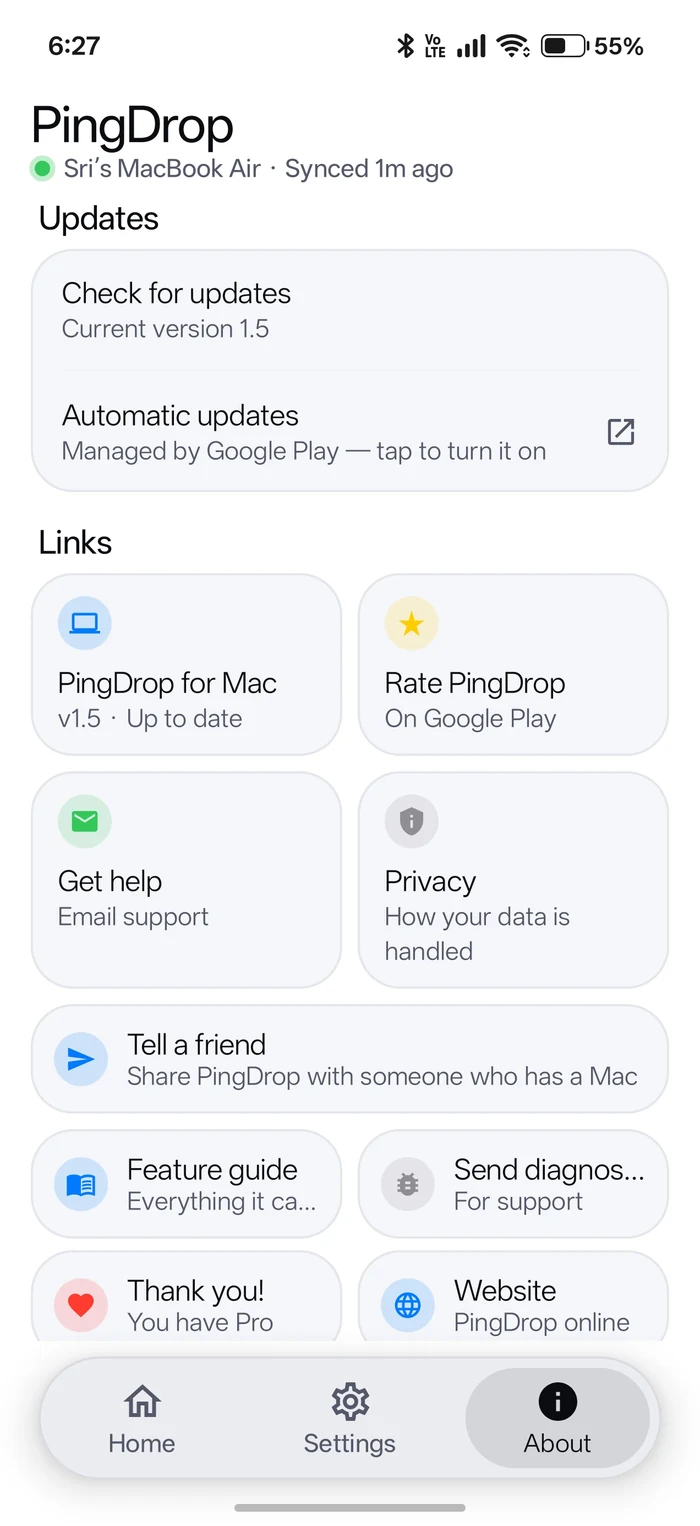
  • Help built inSend diagnostics and a Feature guide in the phone's About tab.

The apps

Clean on both sides.

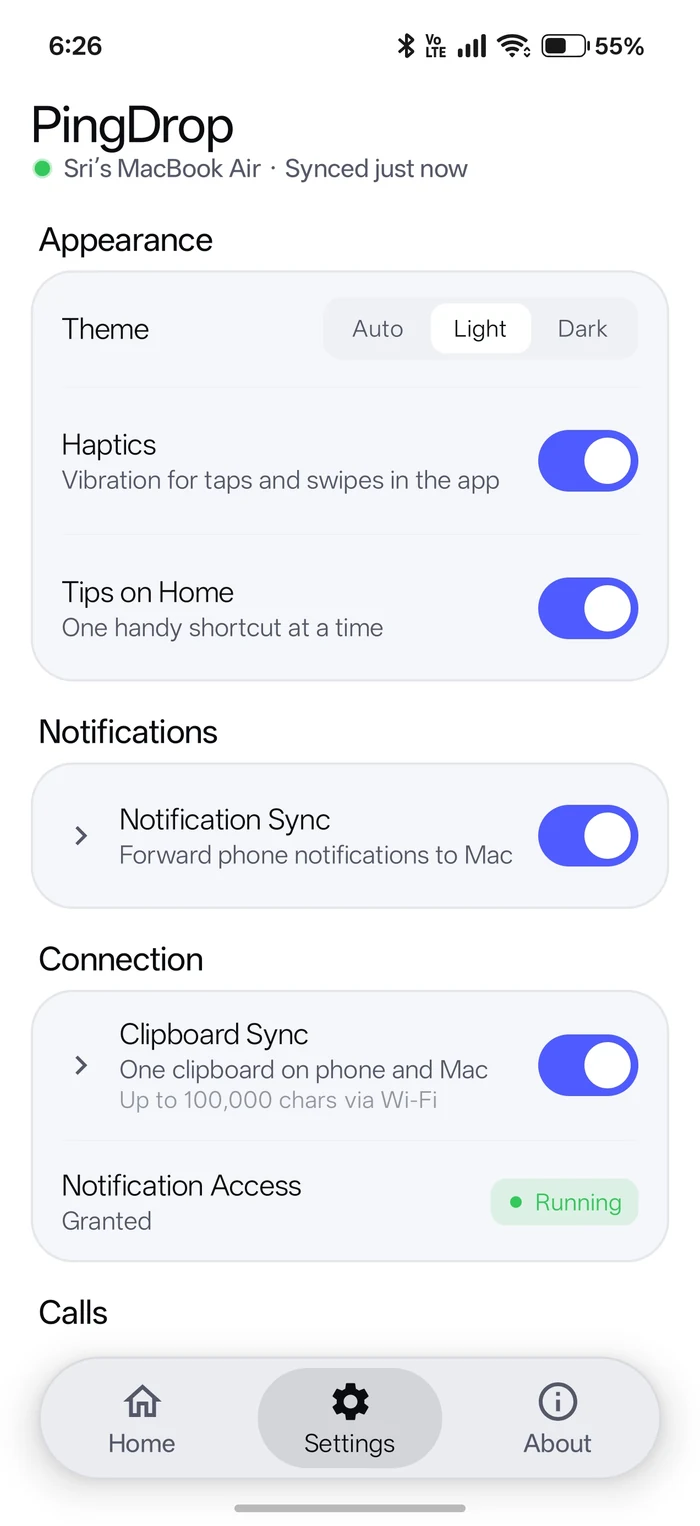
A menu bar app on the Mac. Three simple tabs on the phone.

How it works

Set up in a minute.

  1. +
    01

    Install both apps

    PingDrop from Google Play on your phone, and the Mac app from below. It lives in the menu bar, not the Dock.

  2. 02

    Scan to pair

    On the phone: allow notification access, then Scan the QR code. On the Mac: menu bar icon → Pair New Phone.

  3. Wi-FiBLE
    03

    That's it

    Both sides connect within seconds, and reconnect on their own.

PRO

PingDrop Pro

One purchase in the Android app — no subscription — unlocks Pro on your phone and your Mac.

New in 1.5: walk-away lock
  • No adsThe banner and full-screen ads in the Android app are gone for good.
  • Any file sizeFree sends are up to 2 GB each, with 3 bigger ones to try. Pro has no limit.
  • Reply from your MacAnswer a message right from its notification.
  • Notification rulesQuiet hours, plus Normal, Quiet or Priority per app.
  • Calendar remindersYour Mac's upcoming events, on your phone.
  • Clipboard imagesCopy an image on your Mac, paste it on your phone.
  • Custom battery alertsUp to 10 alerts for your phone and your Mac.
  • Files your wayAuto-accept transfers and choose where they save.
  • Media controlsSee what's playing on your phone and play, pause or skip from the Mac.
  • Notification historySearch every notification from the last 30 days, on your Mac.
  • Auto-send a folderA folder you select, like Screenshots, goes to your Mac automatically.
  • Home-screen widgetYour Mac's battery, plus Send files, Clipboard and Ring Mac.
  • Phone as a webcamYour phone's camera in FaceTime, Zoom and Meet, in up to 2K.
  • Photo from your phoneTake a photo on the phone and it opens on your Mac.
  • Walk-away lock New Walk away with your phone and your Mac locks itself.

    Set the distanceNot while you typeMac › Preferences › Pro

PingDrop Pro

Pro, in action.

WebcamPRO

Your phone, as your Mac's webcam.

Pick “PingDrop Camera” in FaceTime, Zoom or Meet. Your phone asks once, then streams over Wi-Fi in up to 2K — encrypted, no cable, nothing else to install. Picture sideways? Turn it with ⟲ ⟳ in the Mac's camera window.

Not in use
9:41
Video call
PingDrop CameraPick it as the camera
● Live · 1080p · 30 fps
Camera: FaceTime HD Camera ▾
9:4182%
PingDropUse this phone as your Mac's camera?
● Live on your Mac
Auto-sendPRO

Screenshots land on your Mac.

Pick a folder once — Screenshots, Camera, anything. Every new file in it goes to your Mac on its own, no tapping Send.

Nothing sent yet
9:41
Auto-received from phone
9:4182%
ReplyPRO

Answer from the notification.

WhatsApp, Telegram, SMS — reply on the Mac without picking up your phone.

9:41
W
Riya · WhatsAppAre you coming tonight?
↑
9:4182%
Riya
Are you coming tonight?
MediaPRO

Your music, from the menu bar.

See what's playing on your phone — then play, pause or skip from the Mac.

Use the buttons on the Mac

9:41
Midnight DriveAurora Bloom
9:4182%
9:41
Midnight DrivePaused
HistoryPRO

Find that notification again.

Search the last 30 days of your phone's notifications, on your Mac. Kept on the Mac only.

9:41
Notification History
⌕
WidgetPRO

PingDrop on your home screen.

Your Mac's battery at a glance, with Send, Clipboard and Ring Mac one tap away.

Tap Ring Mac on the widget

9:41
Your phone is ringing this Mac
9:4182%
MacBook⚡82% Charging
SendClip
PhotoPRO

Take a photo straight into your Mac.

Click Photo on the Mac, take the shot on your phone, and it opens on the Mac a moment later. For a receipt, a whiteboard, a page of notes.

Then tap the shutter on the phone
9:41
RingOpen LinkCamera
Photo from your phone
9:4182%
PingDropYour Mac wants a photo

Download

Free on both platforms.

Android

Android 7.0 or later. Updates through Google Play.

  • –downloads
  • Freeno account
Get it on Google Play
  1. Install PingDrop from Google Play and open it.
  2. Allow notification access and nearby devices when asked.
  3. Tap Scan the QR code and scan the code on your Mac.
  4. Pro: Upgrade — or type a promo code under the Upgrade button.

Mac

macOS 14 Sonoma or later. A small menu bar app.

  • –downloads
Coming soon — watch on GitHub
  1. Open PingDrop.dmg and drag PingDrop into Applications.
  2. Open it from Applications — it lives in the menu bar, top right.
  3. Allow Local Network and Bluetooth when macOS asks.
  4. Menu bar icon → Pair New Phone, then scan with your phone.
  5. Webcam (Pro): Preferences → Add PingDrop Camera, allow it in System Settings, then pick PingDrop Camera in FaceTime, Zoom or Meet.

FAQ

Questions, answered.

Is PingDrop free?

Yes. Both apps are free. The Android app shows a small banner ad and, now and then, a full-screen ad after a transfer. Free transfers are up to 2 GB each, with 3 bigger ones to try. A one-time PingDrop Pro purchase removes the ads and the limit — along with unlocking the Pro features.

Does my data go through a server?

No. Your phone and Mac talk directly over your local network or Bluetooth, encrypted with a key that never leaves the two devices. There's no account and nothing in the cloud. The only internet traffic is Google's ads, billing and update services in the Android app — PingDrop never passes your notifications, clipboard or files to them.

Do both devices need to be on the same Wi-Fi?

Same Wi-Fi is fastest. When they aren't, PingDrop falls back to Bluetooth LE as long as they're in range.

I lost my phone in the house. Can the Mac find it?

Yes. Click Ring Phone in PingDrop's menu bar and your phone rings loudly for up to 30 seconds, even on silent. It works the other way too: Ring my Mac on the phone.

Can I use my phone as a webcam in Zoom or Meet?

Yes, with PingDrop Pro. On the Mac, open PingDrop's Settings → PingDrop Camera → Add PingDrop Camera and allow it in System Settings once. Then pick PingDrop Camera in FaceTime, Zoom, Meet, Teams or your browser (WhatsApp doesn't support cameras like this): your phone asks, you tap Start, and it streams over your Wi-Fi in 720p, 1080p or 2K. The picture goes straight from the phone to your Mac, encrypted, and the phone shows that its camera is in use the whole time. It's a real camera to macOS, so FaceTime's Reactions, background blur and Studio Light work on it too.

Can I answer calls on my Mac?

Yes, free. When your phone rings, a card on your Mac shows who's calling, with Answer, Decline and Silence — for phone calls and WhatsApp calls. The call's sound stays on your phone (or its earphones). To answer and end calls with any phone app, allow Phone calls once: PingDrop → Settings → Calls on the phone (or Allow on phone on the Mac's call card). Google's Phone app gives the most controls — mute and speaker too; some makers' phone apps don't share those.

How do I update PingDrop on my Mac?

From 1.4.2 on, PingDrop updates itself: when there's a new version, the menu bar shows Update to PingDrop … — one click and it restarts as the new version. You can also use Preferences → Updates → Check for Updates…. The Android app updates through Google Play.

Does auto-send need access to all my photos?

No. You pick one folder with Android's own folder picker, and PingDrop can read only that folder. Only files added after you chose it are sent, over your Wi-Fi, to your Mac.

Does it work with an iPhone?

No — PingDrop is for Android phones and Macs.

Can I pair more than one phone?

One phone per Mac. Pair New Phone replaces the current one.

Notifications stop after a while. What do I do?

Some Android phones stop background apps to save battery. If PingDrop shows Battery Optimization Active, tap Fix and let it run unrestricted.

The Mac asks to find devices on my local network.

Allow it — that's how the Mac reaches your phone. PingDrop only ever talks to the phone you paired.

How do I uninstall?

On the Mac, quit PingDrop from its menu and drag it from Applications to the Bin. On Android, uninstall it like any other app.

Support

Made by one developer.

PingDrop is free. If it saves you a few trips to your phone, a coffee keeps it going.